

Integration between applications is often the key to their business and even the reason for their success that stand out from the competition. Implementing Application Program Interfaces (commonly known as APIs) is essential because they enable seamless interaction between completely different systems, allowing developers to reuse and expand existing functionalities without building everything again.
In the previous section… Gotta Upload ’Em All! File Uploads with Rails and Active Storage
Ruby on Rails takes the discussion to another level, offering a robust, flexible, and simple way to build this essential feature in modern applications. Rails has built-in support for JSON serialization and easy ways to implement API versioning and define RESTful actions. Get ready as we’re going to see more Convention over Configuration helping us reduce work and maximize consistency, making development faster and more rewarding.
- Today’s plan is to have all the CRUD operations exposed as APIs.
- Implement responses in formats such as JSON, XML, and CSV.
- Use namespacing and versioning to make our API future-proof.
- As a bonus, learning about design patterns like Service Object, and Serializer. We’ll also explore the use of Helpers.
1st API implementation
Our first goal is to expose two operations of our beloved Pokémon digital library Railsdex:
- List of Pokémons
- Operation:
GET/pokemons - Endpoint:
/api/v1/pokemons
- Operation:
- Show Pokémon details
- Operation:
GET/pokemons/{id} - Endpoint:
/api/v1/pokemons/{id}
- Operation:
Create the controller
Start a terminal at your project root and run:rails generate controller Api::V1::Pokemons index show --no-template-engine
The command creates a versioned controller named PokemonsController with methods index and show under namespace api/v1. Also, notice the optional parameter --no-template-engine used to avoid the creation of views as this is an API-only controller.
Adjust routes
Rails generate command has added routes to both actions, but they need a quick tweak. Edit /config/routes.rb and replace the code as below:
# get "pokemons/index"
get "pokemons", to: "pokemons#index"
# get "pokemons/show"
get "pokemons/:id", to: "pokemons#show"
Implement methods
Let’s implement each of created methods to have the API working as required. Open the controller file /app/controllers/api/v1/pokemons_controller.rb. You see the skeleton class generated by Rails:
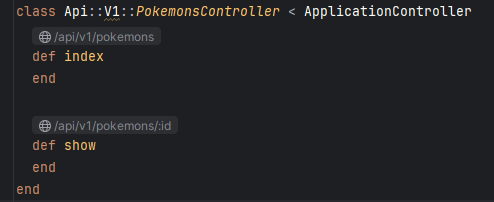
index
Declare the body of method index as:
@pokemons = Pokemon.all
render json: @pokemons
These two lines of code are all you need to have your API working. It’s awesome… it’s Rails, baby! Checking what is there:
- #1: Loads all Pokemon records into variable
@pokemons. - #2: Keyword
renderis actually a method used to generate and send back to the client the response for its request.jsonis the format of response and@pokemonsthe contents. To summarize, generates a response in JSON format of pokemons contents -presumably a list of Pokémon details.
show
Add the body of method show as:
@pokemon = Pokemon.find(params[:id])
render json: @pokemon
Only two lines do all the work:
- #1: Loads the Pokemon record with given ID into variable
@pokemon. - #2: Calls method
renderusing formatjsonand contents as@pokemon-an object with Pokémon’s details.
Try it!
Start the application:rails server

I’m using cURL for all API iterations -it’s a personal preference for simplicity. Feel free to use any tool you prefer, such as Postman or SoapUI.
First, let’s call the API to list all Pokémons currently available in Railsdex:curl http://localhost:3000/api/v1/pokemons
The response will include a list of Pokémon and their details in JSON format:
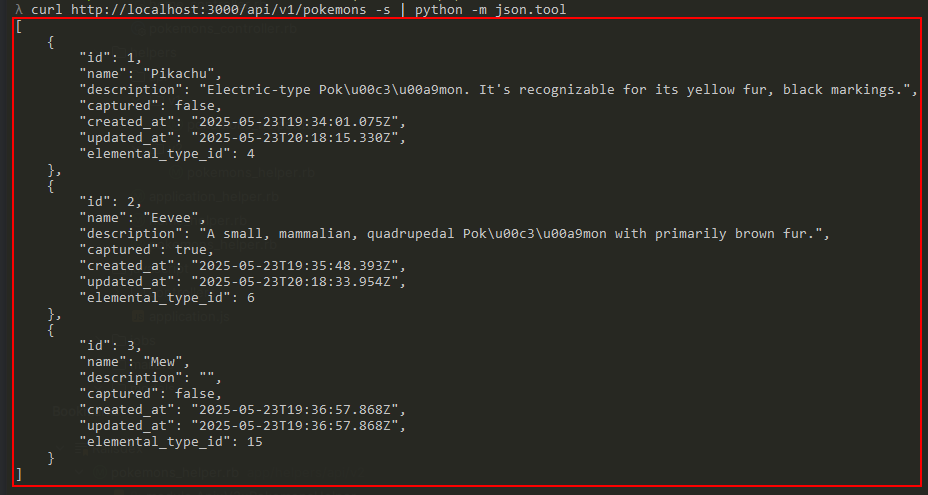
Now, what about retrieving the details of a specific Pokémon? Just run:curl http://localhost:3000/api/v1/pokemons/1

And there you go! You’ve just built your very first fully functioning API. Nice job!
API v2: Enhanced features, flexible formats, and more
Now that your application can provide indexed Pokémon data to other systems, it’s time for some enhancements.
Currently, the API doesn’t return any information about a Pokémon’s picture. Also, the date and time attributes may need some formatting to make them easier to understand across different clients. On top of that, we want to support additional response formats like XML and CSV. And finally, we need to give integrated applications the ability to create and update Pokémon entries.
That’s quite a list -so it’s the perfect moment to introduce a second version of our API.
API versioning is critically important in modern systems because it allows the application to evolve and improve over the time without breaking the current implementation -especially the one already being used by third-party clients. It’s also considered a best practice in RESTful API design (though it’s not strictly required). The most common and straightforward way to express versioning is by including the version number in the URL path.
We’ll enhance existing operations and introduce new ones in version 2:
- List of Pokémons
- Operation:
GET/pokemons - Endpoint:
/api/v2/pokemons
- Operation:
- Show Pokémon details
- Operation:
GET/pokemons/{id} - Endpoint:
/api/v2/pokemons/{id}
- Operation:
- Create a Pokémon
- Operation:
POST/pokemons - Endpoint:
/api/v2/pokemons
- Operation:
- Update a Pokémon
- Operation:
PUT/pokemons/{id} - Endpoint:
/api/v2/pokemons/{id}
- Operation:
- Remove a Pokémon
- Operation:
DELETE/pokemons/{id} - Endpoint:
/api/v2/pokemons/{id}
- Operation:
You might notice that several of these endpoints share the same path. For instance, both viewing and deleting a specific Pokémon use /pokemons/{id}. So how does Rails know whether to show the Pokémon or delete it?
The answer lies in the HTTP method. In a Rails application, each controller action is triggered based on the HTTP method used in the request -thanks to Rails’ Convention over Configuration philosophy. Here’s a quick mapping of HTTP methods to controller actions:

GETmaps toindexandshow.POSTmaps tocreate.PUT/PATCHmaps toupdate.DELETEmaps todestroy.
Add support to CSV files and data
Because we want to support responses in Comma-Separated Values (CSV) format, we need to include the CSV library in our project. To do that, add the following line to your/Gemfile:
# Support for handling CSV format
gem "csv"
Run the command:bundle install
Create the controller
Create the new controller version by running:rails generate controller Api::V2::Pokemons --no-template-engine
Add routes
Edit /config/routes.rb and add inside namespace :api and just after namespace :v1 the code:
namespace :v2 do
  resources :pokemons
end
Implement methods
Rails has created the skeleton controller class at /app/controllers/api/v2/pokemons_controller.rb, open and edit this file.
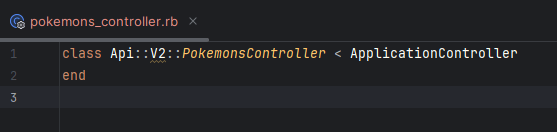
It’s a nice, empty class, just like a frame waiting for our art to fill it!
index
Let’s start declaring the action for returning a list of Pokémons. This time, it comes with extra features -like it’s on steroids:
def index
  @pokemons = Pokemon.includes(:elemental_type).all

  respond_to do |format|
    format.any { render json: PokemonJsonSerializer.new(@pokemons).as_json }
  end
end
Let’s breaking it down:
- #2: Like in version 1, this loads all Pokémon records -but now includes their associated
elemental_typeto avoid N+1 query issues. - #4: The
respond_tomethod specifies how the controller should handle different request formats, based on theAcceptheader. - #5: Two interesting parts here:
format.any– defines the default response format -in this case, JSON.PokemonJsonSerializer– is a class follwoing the Serializer design pattern, responsible for transforming Pokémon data into rich, structured JSON output.
PokemonJsonSerializer
Serializer in Rails is used to control how Ruby objects are converted into common formats for API responses. Its main characteristics include encapsulation, reusability, customization, versioning, and consistency. The Rails Serializer pattern provides a flexible and maintainable way to structure API responses, ensuring that only the desired data is exposed and presented in the specified format.
The index method responds in any format by using the Serializer Pattern implemented in /app/serializers/pokemon_json_serializer.rb. You need to create this file and add the following:
# JSON serializer for Pokemon object.
# This can be used to generate JSON contents from a collection of Pokemon objects as well as a single Pokemon object.
#
# @example:
#   PokemonJsonSerializer.new(Pokemon.all).as_json
#   PokemonJsonSerializer.new(Pokemon.find(1)).as_json
#
class PokemonJsonSerializer
  # @param input [Array<Pokemon>, Pokemon] The input data.
  def initialize(input)
    @input = input
  end

  def as_json
    if Rails.env.development?
      # Active Storage, when using the Disk service, requires explicit URL options to generate a full static URL for attachments
      ActiveStorage::Current.url_options = Rails.application.routes.default_url_options
    end

    if @input.is_a?(Enumerable)
      @input.map { |i| serialize(i) }
    else
      serialize(@input)
    end
  end

  private

  # Build the JSON contents from the input data.
  #
  # @return [Hash] The JSON contents.
  def serialize(pokemon)
    json = {}.tap do |hash|
      hash[:id] = pokemon.id
      hash[:name] = pokemon.name
      hash[:description] = pokemon.description if pokemon.description.present?
      hash[:captured] = pokemon.captured?
      hash[:created_at] = pokemon.created_at.iso8601
      hash[:updated_at] = pokemon.updated_at.iso8601
      hash[:elemental_type] = { id: pokemon.elemental_type.id, name: pokemon.elemental_type.name }
      hash[:picture_url] = pokemon.picture.url if pokemon.picture.present?
    end
  end
end
Please pay extra attention to line #17. As the comment just above that line explains, there is a special requirement when using Active Storage + Disk service + static URL of the attachment -which is exactly our case at line #41. Additionally, you need to tell Rails how to construct the URL and this is done in /config/environments/development.rb. Open the environment configuration file and append the following code:
# When using Disk service, Active Storage needs to know how to construct a URL that points to the local server
Rails.application.routes.default_url_options = {
  host: "localhost",
  port: 3000,
  protocol: "http"
}
Run the server rails server e call the endpoint -just like before but now v2:
curl http://localhost:3000/api/v2/pokemons
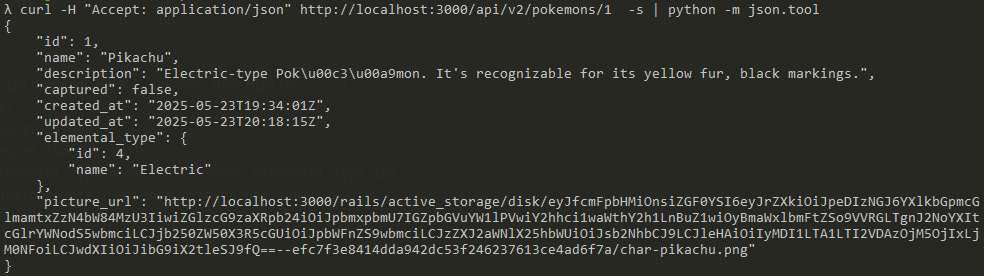
The API response containing the list of Pokémons and their details in JSON format differs slightly from the response received in version 1:
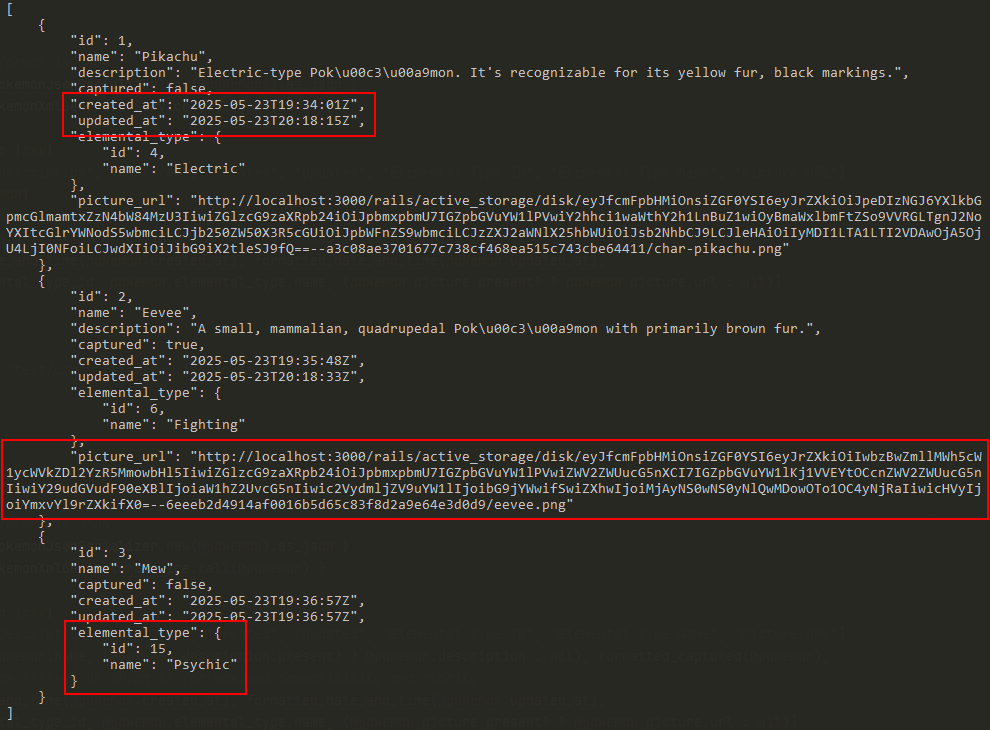
- Date and time attributes
created_atandupdated_atare formatted as ISO-8601. - Pokémon’s picture URL is part of details.
- Both
idandnameof Pokémon’s elemental type are available -rather onlyidfrom the previous version.

index respond to XML
We also want to support returning the list of Pokémons as an XML document -since some systems still use this format. To do this, edit /app/controllers/api/v2/pokemons_controller.rb and, right after the format.any line, add:
format.xml { render xml: PokemonXmlGeneratorService.call(@pokemons) }
That’s a simple line with a new friend. While format.xml tells Rails to respond to requests asking for XML contents, PokemonXmlGeneratorService.call(@pokemons) stands out as something a bit different from what you’ve done so far -kind of a new approach.
PokemonXmlGeneratorService
To transform Pókemon details into XML contents, we’re implementing a class using the Service Object design pattern.
In Rails, the Service design pattern is used to encapsulate complex business logic. The service must focus on a single and specific responsibility. Some benefits are the reusability, as they can be reused across controllers, models, jobs, and etc. The testability by isolating logic, service objects make it easier to test business processes. Also the maintainability on keeping the business logic out of other components to a cleaner and organized codebase.
Create the service at /app/services/pokemon_xml_generator_service.rb and add:
require "builder"

# XML generator service for Pokemon object.
# This can be used to generate XML documents from a collection of Pokemon objects as well as a single Pokemon object.
# The XML document contents will be generated in friendly format using 2spaces for indentation.
#
# @example:
#   PokemonXmlGeneratorService.call(Pokemon.all)
#   PokemonXmlGeneratorService.call(Pokemon.find(1))
#
class PokemonXmlGeneratorService
  POKEMON_ELEMENT = "pokemon".freeze

  def self.call(input)
    new(input).call
  end

  # @param input [Array<Pokemon>, Pokemon] The input data.
  def initialize(input)
    @input_data = input
    @root_element = input.is_a?(Enumerable) ? POKEMON_ELEMENT.pluralize : POKEMON_ELEMENT
    @singular_element = input.is_a?(Enumerable) ? POKEMON_ELEMENT : nil
  end

  def call
    if Rails.env.development?
      # ActiveStorage, when using the Disk service, requires explicit URL options to generate a full static URL for attachments
      ActiveStorage::Current.url_options = Rails.application.routes.default_url_options
    end

    build_xml
  end

  private

  # Build the XML document from the input data.
  #
  # @return [String] The XML document contents in friendly format using 2spaces for indentation.
  def build_xml
    # Friendly output
    xml = Builder::XmlMarkup.new(indent: 2)
    xml.instruct! :xml, version: "1.0", encoding: "UTF-8"

    if @singular_element.present?
      xml.tag!(@root_element) do
        @input_data.each do |pokemon|
          write_item(xml, @singular_element, pokemon)
        end
      end
    else
      write_item(xml, @root_element, @input_data)
    end

    xml.target!
  end

  # Write a single item to the XML document.
  #
  # @param xml [Builder::XmlMarkup] The XML document object.
  # @param element [String] The element name -expects <code>pokemon</code>.
  # @param pokemon [Pokemon] Pokémon's details object.
  def write_item(xml, element, pokemon)
    xml.tag!(element) do
      xml.id pokemon.id
      xml.name pokemon.name
      xml.description pokemon.description.present? ? pokemon.description : nil
      xml.captured pokemon.captured?
      xml.created_at pokemon.created_at.iso8601
      xml.updated_at pokemon.updated_at.iso8601
      xml.elemental_type(pokemon.elemental_type.name, id: pokemon.elemental_type.id)
      xml.picture_url pokemon.picture.present? ? pokemon.picture.url : nil
    end
  end
end
This class focuses entirely on manipulating XML content. The beauty of the Service pattern lies in its cohesion -doing one simple job well.
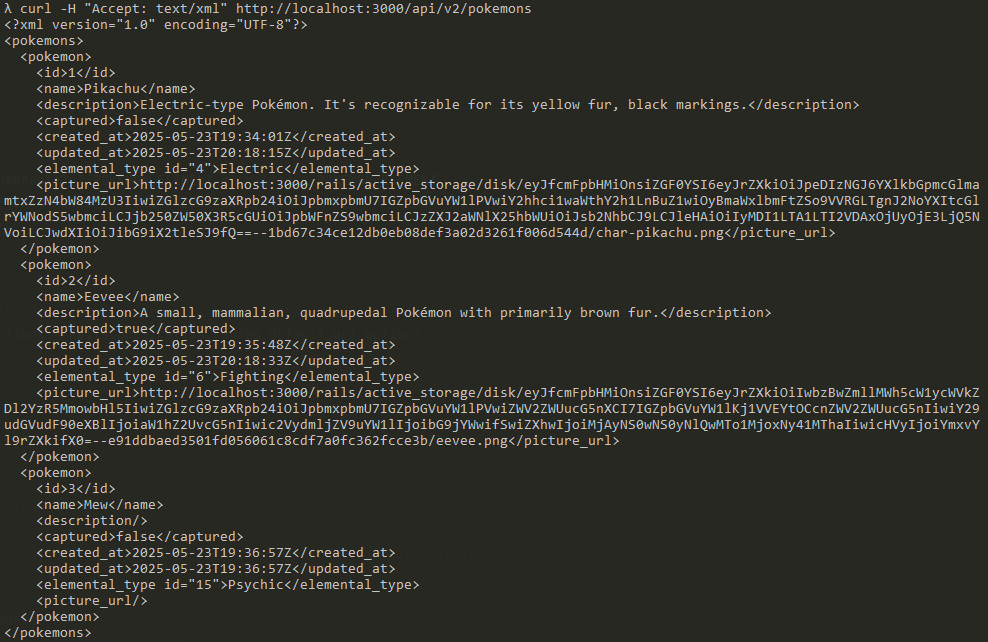
It’s time for results. Put the server up rails server and call the endpoint passing the extra header asking for XML contents:
curl -H "Accept: text/xml" http://localhost:3000/api/v2/pokemons
Since we explicitly accept the XML format… what you ask for is exactly what you get:
index respond to CSV
The CSV format is a good example of what is old never die. It was created to store and exchange data back to the early 1970s, and it’s still widely used today.
Edit /app/controllers/api/v2/pokemons_controller.rb and after format.xml, add:
format.csv {
  contents = CSV.generate do |csv|
    csv << ["ID", "Name", "Description", "Captured", "Created", "Updated", "Elemental Type ID", "Elemental Type Name", "Picture URL"]
    @pokemons.each do |pokemon|
      csv << [pokemon.id, pokemon.name, (pokemon.description.present? ? pokemon.description : nil), formatted_captured(pokemon),
              # Format dates as YYYY-MM-DD HH:MM:SS for maximum compatibility and clarity
              formatted_date_and_time(pokemon.created_at), formatted_date_and_time(pokemon.updated_at),
              pokemon.elemental_type_id, pokemon.elemental_type.name, (pokemon.picture.present? ? pokemon.picture.url : nil)]
    end
  end

  send_data contents, type: "text/csv", filename: "pokemons.csv"
}
This time, we’re writing most of the logic directly in the controller. I’m not saying whether that’s good or bad -but I do like the idea of introducing this third approach as an example of how different strategies can meet similar needs.
Lines #5 and #7 call two noteworthy methods: formatted_captured and formatted_date_and_time. These methods aren’t defined in the controller itself; instead, they belong to a Helper module.
PokemonsHelper
Rails already created the corresponding Helper module when the controller class was generated -it’s there, just empty. We’re going to make use of this module to define a couple of methods that apply formatting and transformation rules to data included in the CSV response.
A Helper module is typically used to encapsulate reusable logic. They are commonly responsible for handling presentation-related tasks, such as formatting data, or transforming the data following specific rules.
Edit the file /app/helpers/api/v2/pokemons_helper.rb and, inside the module’s body, add:
# Returns a human-readable captured status.
#
# @param captured [Boolean] The captured status.
# @return [String] "Yes" if captured is true, "No" otherwise.
#
# @example
#   formatted_captured(true)  # => "Yes"
#   formatted_captured(false) # => "No"
def formatted_captured(captured)
  captured ? "Yes" : "No"
end

# Formats a DateTime object as a string following "YYYY-MM-DD HH:MM:SS" format.
#
# @param date_and_time [DateTime] The date and time to format.
# @return [String] The formatted date and time.
#
# @example
#   formatted_date_and_time(DateTime.now) # => "2025-05-22 21:41:00"
def formatted_date_and_time(date_and_time)
  date_and_time.strftime("%Y-%m-%d %H:%M:%S")
end
Back to controller, edit /app/controllers/api/v2/pokemons_controller.rb. Right after the class declaration and before method index , add:
include Api::V2::PokemonsHelper

if Rails.env.development?
  # ActiveStorage, when using the Disk service, requires explicit URL options to generate a full static URL for attachments
  ActiveStorage::Current.url_options = Rails.application.routes.default_url_options
end
- #2: By including the helper, we’re making its methods available for use in the controller -even though helpers are typically designed to be used in views, not directly in controllers.
- #4 – #7: Special case of serving static URLs already discussed.
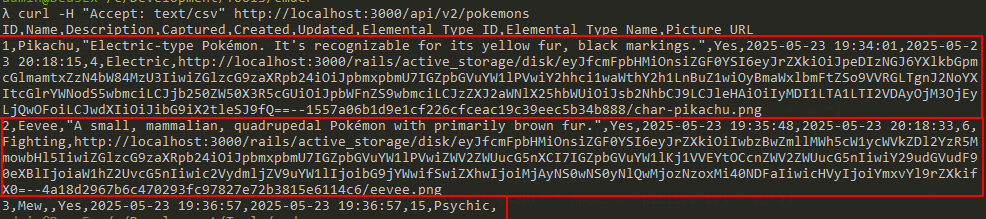
Server up rails server , hit the endpoint passing the extra header for CSV contents:
curl -H "Accept: text/csv" http://localhost:3000/api/v2/pokemons
Here you’re:
show
What if I told you that we barely need to implement anything to get the show action working? With just a few tweaks, we can have both index and show share most of the same logic -with up to 95% code reuse!
Edit /app/controllers/api/v2/pokemons_controller.rb, and declare the method show as:
def show
  respond_to do |format|
    handle_pokemon_data_request(format, @pokemon)
  end
end
And before the closing class end, add:
private

def set_pokemon
  @pokemon = Pokemon.find(params[:id])
rescue ActiveRecord::RecordNotFound
  respond_to do |format|
    format.any { render json: { error: "Pokemon ##{params[:id]} not found" }, status: :not_found }
    format.xml { render xml: { error: "Pokemon ##{params[:id]} not found" }, status: :not_found }
  end
end

def handle_pokemon_data_request(format, data)
  format.any { render json: PokemonJsonSerializer.new(data).as_json }
  format.xml { render xml: PokemonXmlGeneratorService.call(data) }
  format.csv {
    contents = CSV.generate do |csv|
      csv << ["ID", "Name", "Description", "Captured", "Created", "Updated", "Elemental Type ID", "Elemental Type Name", "Picture URL"]
      data = Array.new(1) { data } if data.is_a?(Pokemon)
      data.each do |pokemon|
        csv << [pokemon.id, pokemon.name, (pokemon.description.present? ? pokemon.description : nil), formatted_captured(pokemon),
                # Format dates as YYYY-MM-DD HH:MM:SS for maximum compatibility and clarity
                formatted_date_and_time(pokemon.created_at), formatted_date_and_time(pokemon.updated_at),
                pokemon.elemental_type_id, pokemon.elemental_type.name, (pokemon.picture.present? ? pokemon.picture.url : nil)]
      end
    end

    send_data contents, type: "text/csv", filename: "pokemons.csv"
  }
end
- #3: An improved loading method of the Pokemon data with error handling returning HTTP status code 404 “Not Found”.
- #13 – #28: This is basically the extraction of code implemented to
index.
Scroll up to the beginning of the class and after the include of helper, add:
# Load the Pokémon data and handle eventual RecordNotFound gracefully
before_action :set_pokemon, only: [:show]
While refactoring method index , replace the code inside respond_to by:
handle_pokemon_data_request(format, @pokemons)
Start the application using rails server and try out all the four possibilities:
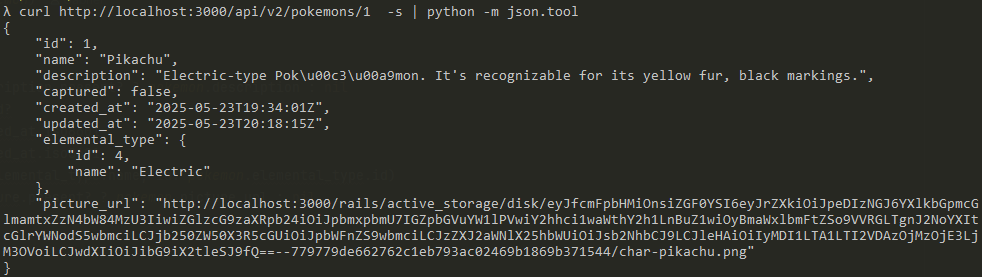
Accepting any/all response contents
curl http://localhost:3000/api/v2/pokemons/1
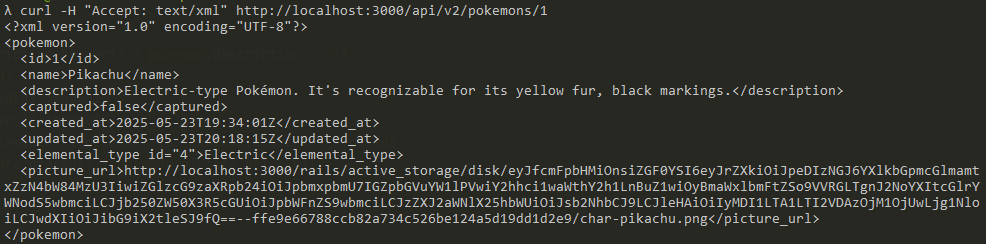
Accepting XML
curl -H "Accept: text/xml" http://localhost:3000/api/v2/pokemons/1
Accepting CSV
curl -H "Accept: text/csv" http://localhost:3000/api/v2/pokemons/1

Accepting JSON
curl -H "Accept: application/json" http://localhost:3000/api/v2/pokemons/1
create
By now, you’ve written most of the code and you are already reusing it -nice!
Next, since you’re about to implement the action for creating a new Pokémon record, you need to tell the controller which parameters it’s allowed to accept. To do this, edit /app/controllers/api/v2/pokemons_controller.rb, and, after the private keyword, add the following:
def pokemon_params
  params.permit(:name, :description, :captured, :elemental_type_id, :picture)
end
By default, Rails includes security features to prevent attacks of Cross-Site Request Forgery (CSRF) on non-GET requests. In the case of an API endpoint exposed to the public, it is needed to disable the CSRF protection. To do this, add the following line at the top of your controller class, just after the include keyword:
# Disables CSRF (Cross-Site Request Forgery) protection
skip_before_action :verify_authenticity_token
Rails protects the application against CSRF attacks by embedding a token in each page form and storing a copy of this token in the user’s session. Thus, when the form is submitted, the application checks that the token provided as part of the form payload matches the one in the session. The request operation is rejected and a error is raised when they don’t match. APIs usually make use of other authentication strategies like JWT tokens, OAuth, API Key, Bearer Token, etc.
Declare the method create as:
def create
  @pokemon = Pokemon.new(pokemon_params)

  if @pokemon.save
    respond_to do |format|
      format.any { render json: PokemonJsonSerializer.new(@pokemon).as_json, status: :created }
      format.xml { render xml: PokemonXmlGeneratorService.call(@pokemon), status: :created }
    end
  else
    respond_to do |format|
      format.any { render json: @pokemon.errors, status: :unprocessable_entity }
      format.xml { render xml: @pokemon.errors.full_messages, status: :unprocessable_entity }
    end
  end
end
Pretty much everything in this method’s code should look familiar by now. One important detail to note: when the Pokemon object cannot be saved, a detailed error response is returned to the client -see lines #11 and #12:
@pokemon.errors: A list of error messages describing what prevented the save.:unprocessable_entity: A symbol representing the HTTP status code 442, “Unprocessable Entity”.
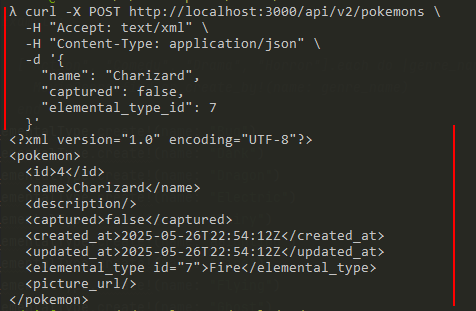
Now, start your server with rails server , and call the endpoint providing the details of the Pokémon you want to create. Don’t forget to include the extra header for XML content to test the response format and behavior.
curl -X POST http://localhost:3000/api/v2/pokemons \
  -H "Accept: text/xml" \
  -H "Content-Type: application/json" \
  -d '{
    "name": "Charizard",
    "captured": false,
    "elemental_type_id": 7
  }'
As result:
update
Edit /app/controllers/api/v2/pokemons_controller.rb, and after the declaration of method create, add:
def update
  if @pokemon.update(pokemon_params)
    respond_to do |format|
      format.any { render json: PokemonJsonSerializer.new(@pokemon).as_json, status: :accepted }
      format.xml { render xml: PokemonXmlGeneratorService.call(@pokemon), status: :accepted }
    end
  else
    respond_to do |format|
      format.any { render json: @pokemon.errors, status: :unprocessable_entity }
      format.xml { render xml: @pokemon.errors.full_messages, status: :unprocessable_entity }
    end
  end
end
The update method is quite similar to create , and there’s not much to comment -except for one small detail you might have noticed: there’s no explicit assignment to @pokemon. So, how does the application know which Pokémon to update?
A few steps back, when we implemented the showmethod, we also add a set_pokemon method. This method runs before certain actions and assign the @pokemon value using the provided id. However, to make this work for the update action as well, there’s one missing piece. Go to the top of the controller class and update the code to include update like this:
before_action :set_pokemon, only: [:show, :update]
Another start with rails server .
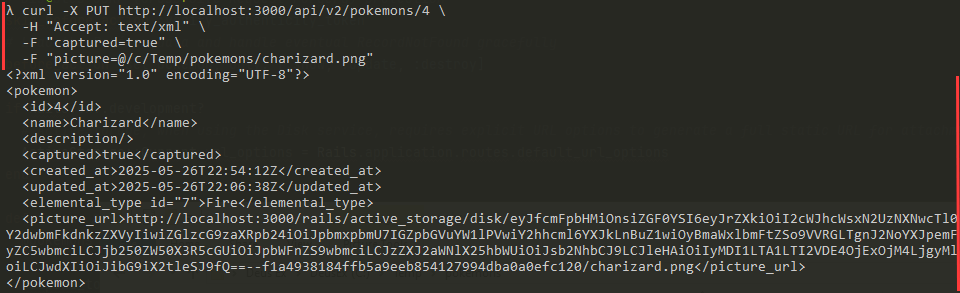
We’re going to confirm the capture of Pokémon Charizad (#4), and also send a picture of this cute dragon-like creature. Run the curl command below and check the response in XML format for a friendly display:
curl -X PUT http://localhost:3000/api/v2/pokemons/4 \
  -H "Accept: text/xml" \
  -F "captured=true" \
  -F "picture=@/c/pokemons/charizard.png"
And here is the updated Pokémon:
destroy
Last but not least, the destroy method is responsible for removing a specific Pokémon from Railsdex’s library.
To implement it, edit /app/controllers/api/v2/pokemons_controller.rb, and, right after the update method declaration, add:
def destroy
  if @pokemon.destroy
    head :no_content
  else
    respond_to do |format|
      format.any { render json: @pokemon.errors, status: :unprocessable_entity }
      format.xml { render xml: @pokemon.errors.full_messages, status: :unprocessable_entity }
    end
  end
end
Similar to create and update, this method calls @pokemon.destroy and responds to the client accordingly. The key point here is line #3: on success, since there are no Pokémon details to return, the application responds with HTTP status code 204 “No Content”, following RESTful convention for such cases.
Add method destroy to the list of allowed methods for the set_pokemon callback:
before_action :set_pokemon, only: [:show, :update, :destroy]
Put your server up rails server, and call the deletion of Pokémon #4:
curl -X DELETE http://localhost:3000/api/v2/pokemons/4
An empty response body is a good sign. But if you want to see the HTTP status code returned:

What awesome code we’ve implemented here! The complete Railsdex API was built in no time, following some of the best practices. Congrats, trainer!
Source code and live application

You can find the full and functional source code for this post on GitHub.
Check it out at github.com/gabrielstelmach/itfromhell/railsdex.
Curious to see Railsdex in action? Catch it live here:
railsdex.itfromhell.net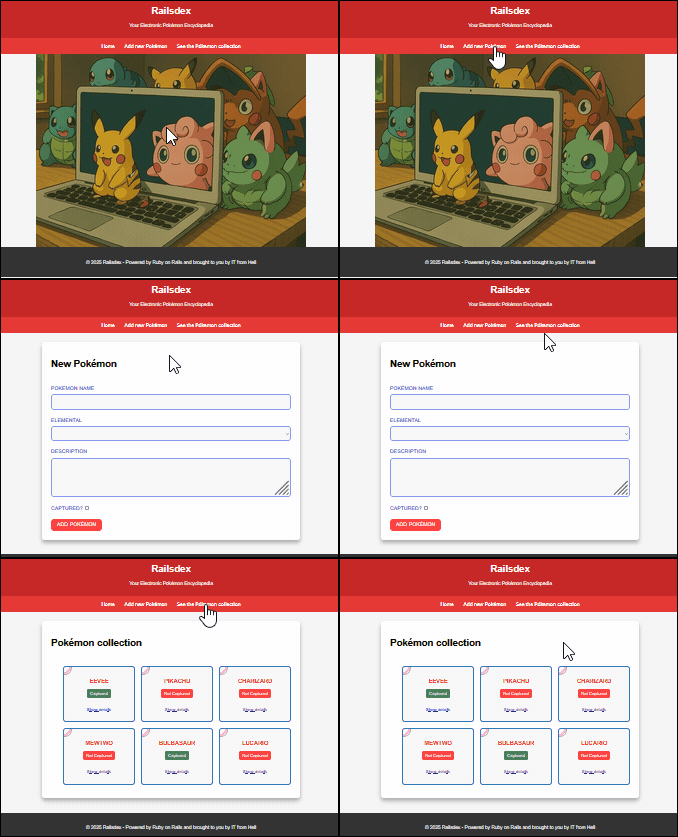
Explore the API and start interacting with it!
https://railsdex.itfromhell.net/api/v1/pokemons
https://railsdex.itfromhell.net/api/v2/pokemons/1
 Murphy is alive!
Leave a comment